
Common Security Risks in Apps Built with AI Tools (Lovable, Cursor, etc.)
AI tools make building apps insanely fast. Security doesn’t scale the same way.
Tools like Lovable, Replit, and Cursor have completely changed how products are built.
You can:
- generate full features in minutes
- connect APIs instantly
- deploy working apps in hours
But there’s a catch:
👉 Most AI-built apps ship with hidden security risks.
And those risks usually don’t show up until:
- you go live
- real users interact
- sensitive data is involved
Why Security Gets Overlooked in AI-Built Apps
AI tools optimize for:
- speed
- output
- iteration
They do not optimize for:
- secure architecture
- access control
- production safety
👉 Security is often assumed - not implemented.
The Most Common Security Risks
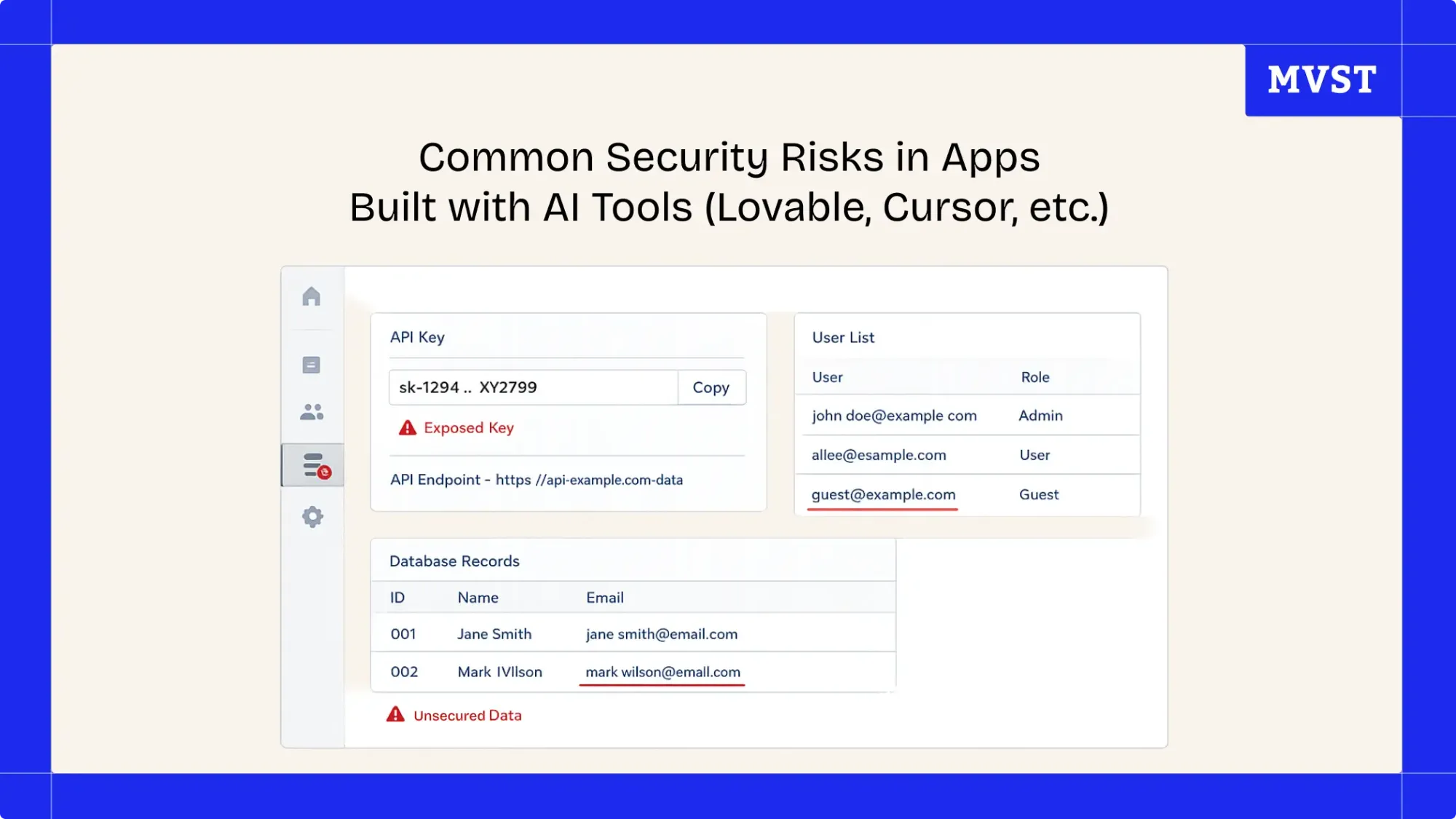
1. Exposed API Keys
AI tools often generate frontend-heavy code.
That can lead to:
- API keys directly in the browser
- secrets inside client-side code
- unrestricted API access
👉 Anyone can inspect your app and extract them.
2. Public or Unprotected Databases
Especially common with:
- Supabase
- Firebase
Typical issues:
- missing access rules
- no row-level security
- public endpoints
👉 Your database might be open without you realizing it.
3. Missing Authentication & Permissions
Prototypes often skip:
- user roles
- permission checks
- secure session handling
Everything works… until users show up.
👉 Then access control becomes a critical vulnerability.
4. Insecure API Endpoints
AI-generated backends often:
- skip validation
- trust client input
- lack rate limiting
👉 This can lead to:
- data leaks
- abuse
- system overload
5. Hardcoded Secrets & Environment Variables
Common in AI-generated code:
- tokens inside code
- credentials in config files
- no separation between environments
👉 Secrets should never live in your codebase.
6. No Monitoring or Logging
Most AI-built apps have:
- no error tracking
- no alerting
- no logs
👉 You won’t even know when something breaks - or gets attacked.
Why This Becomes a Problem at Launch
During development:
- everything works
- data is limited
- usage is controlled
In production:
- users behave unpredictably
- traffic increases
- attackers show up
👉 That’s when these risks turn into real incidents.
Key Insight
How to Fix These Issues (Before Launch)
You don’t need to rebuild your app.
👉 You need to review and harden it.
Focus on:
1. Lock Down Access
- secure API keys
- enforce authentication
- define permissions
2. Secure Your Database
- enable access rules
- implement row-level security
- restrict public endpoints
3. Move Secrets Out of Code
- use environment variables
- separate dev / prod configs
4. Validate All Inputs
- never trust frontend data
- add backend validation
5. Add Monitoring
- error tracking
- logs
- alerts
Before You Go Live, Ask Yourself This
- Can anyone access my API keys?
- Is my database protected?
- Do users only see what they should?
- Would I notice if something breaks?
❓ If you’re unsure about any of these - your app is not ready for production.
Make Your AI-Built App Secure Before Launch
If you built your product with:
- Lovable
- Replit
- Cursor
- or similar tools
👉 the next step is making sure it actually holds in production.
We help teams:
- identify hidden security risks
- secure infrastructure and data
- prepare apps for real users
👉 Run a Launch Readiness Review before going live
Final Thoughts
AI has removed friction from building.
But it hasn’t removed risk.
👉 Fast builds don’t guarantee safe products.
The difference between a working app and a real product is:
security, stability, and production readiness.
Newsroom Ideas, Design & Technology in Motion
Practical insights on AI integration, headless e-commerce, UX/UI design, and digital product development. Case studies, implementation guides, and expert perspectives from the MVST team in Munich and Barcelona.

Breastkeeper Institute: A Full Brand Ecosystem, Built End-to-End
Ghida El BadriAug 07, 2026
Zurhorst Meditation Shop: A Conversion-First Relaunch
Ghida El BadriAug 05, 2026
Welcome to MVST, Tudor Verzes
Ghida El BadriJul 20, 2026